Saturday, January 13, 2024

PCIe Study Notes

Chapter 1: Background

Nice References

PCI

#TO Study Further: Reflected-Wave Signaling and the impact on number of max electrical load. higher frequencies -> less fewer load allowed on the bus. PCI frequency cannot faster than 66MHz.
Transaction Models: Programmed I/O, DMA, Peer-to-Peer.
PCI is a Shared Bus Architecture; PCI arbitration algorithm must be "fair" and not starve any device for access.
PCI Inefficiencies: 1) Retry: init->target not ready for >16T -> target retry initiator (STOP#); 2) Discconnect: init -> target transfer some data, then not ready for >8T -> target signal disconnect to initiator (STOP#)
Address Space Map: memory Map, IO Map, PCI Configuration Space( 256B per function)
PCI Configuration Header: Type0: non-bridge (6BARs), Type1: bridge (2 BARs)

PCI-X

PCI-X transfer efficiency ~85% vs PCI ~50%~60%
PCI-X Split-Transaction Model: Reqeust-Completer. Completer will memorize transaction (address, transaction type, count, requester ID) and signal a split response.
PCI-X add Attribute stage
PCI-X add MSI(Message Signaled Interrupt): eliminate the need to share interrupts accross multiple deivces. memory write trans, to pre-defined address range, data is interrupt vector of that device. cpu avoids the overhead of finding which device generated the interrupt. no sideband pins are needed.
PCI-X uses common or distributted clock: 1. signal skew; 2) clock skew between multiple devices; 3) flight time budget

PCI-X 2.0 is point-to-point design, instead of shared bus arch.
PCI-X 2.0 uses Source-synchronous clocking model

Chapter 2: PCIe Architecture Overview

PCIe serial data transmission.

Transaction Layer

        Full Duplex
        A Transaction is defined as the combination of a Request packet that a delivers a command to a targeted device, together with any completion packets the target sends back in reply.
        posted transactions and non-posted transactions:
                Memory Read -> Non-Posted
                Memory Write -> Posted
                Memory Read Lock -> Non-Posted
                IO Read -> Non-Posted
                IO Write -> Non-Posted
                Configuration Read (Type 0 and Type 1) -> Non-Posted
                Configuration Write (Type0 and Type 1) -> Non-Posted
                Message -> Posted
        Non-posted write (IO write and Cfg write) and Memory Read Lock can only come from the processor.
        TLP (Transaction Layer Packet)
        QoS: Virtual Channel Buffer
                

Data Link Lyaer

        Layer main function:
                TLP error correction: Ack/Nack causing LP retry
                flow control
                some Link power managment
        DLLP fixed length: 8B
        DLLP (Data Link Layer Packets) only transferred between Data Link Layers of the two neighboring devices on a Link, and not routed anywhere else.
        Ack DLLP has the last good TLP sequence Number, and the transmitter flushes all the TLPs that wer send before the acked sequence number. the sequence number is generated by Data Link Layer, so it's always in order!
        Nack DLLP: Receiver truturns a Nack to the transmitter when it detectrs a TLP error and drops this TLP. the transmitter then will replay all unacknowledged TLPs.
        Error Check and Retry: Replay Buffer
        Flow Control: 
        #TODO: hwen in NAK of MRd, while completer resend the CplD, there maybe new MWr from other requester, so the old CplD data may not be up to date. Is this expected?

Physical Layer

        #TODO: transmission order on the physical line.
        Logical Part
                #TODO: ppm long term will cause overflow, how does ethernet and PCIe resolve this?
                Elastic Buffer
                Byte-Stripped?

        Link Training and Initialization: several things are checked or established to ensure proper and optimal operation, such as:
                Link width
                Link data rate
                Lane erversal - Lanes connected in reverse order
                Polarity inversion - Lane polarity connected backward
                Bit lock per Lane - Recovering the transmitter clock
                Symbol lock per Lane - Findding a recognizable position in the bit-stream
                Lane-to-Lane de-skew within a multi-Lane Link
        
        Electriclal Part

        Ordered Sets: always 4B. always terminate at the neighboring deivecs and are not routed through the PCIe fabric.
                used in 1) link training; 2) ppe compensation; 3) enter/exit of low power state on the link

Chapter 3: Configuration Overview

Enumeration

       PCIe Buses: up to 256 Bus; Initial Bus 0 is tpoically assigned by HW to RC. Bus 0 consists of a Virtual PCI bus with integrated endpoints and Virtual PCI-to-PCI Bridges(P2P), which are hard-coded with a Device No. and Function No.
        PCIe Devices: 32 devices per bus; PCIe point-to-point link means that device will always be Device 0. Deach Device must implement Function 0.
        PCIe Functions: Functions do not need to be implemented sequenctially. SW must check every one of the 8 functions to decide which are present.

         Errors should not normally be reported during enumeration.(the enumeration sw could fail since it's typically writtent o execute before the OS or other error handling SW is available.

        Device not present: SW get Vendor ID of FFFFh, reserved for "device not present"
        #TODO: enumeration started after 100ms+link training after reset, how to do it in DV simulation?
        #TODO: what will enum sw do if there is no EP attached to a pci-pci bridge?
        #multi-root system: what if rc assign start bus number 64 to rc, but later find that the total buses are more then 265-64? is this an error?
        It is important to remember that each port on a switch is aBridge, and thus has its own configuration space with a Type 1 Header. In reality, each port (each P2P Bridge) has its own Type 1 Header and performs the same two checks on TLPs when they are seen by that port.


Chapter 4: Address Space & Transaction Routing

Confugration

        Confugartion Space Total 4KB/function:
                1. (256B/64DW) PCI-compatible spece access by legacy PCI software or PCIe enhanced configuration access mechanism: 64B for Configuration Headers (Type0/Type 1); 192B for Function-Specific Configuration Header Space.
                2. (960DW) PCIe Extended space is only accessible by PCIe Ehanhanced Configuration Access Mechanism: for optional extended capability registers: ...
        Enhanced Configuration Mechanism memory-mapped Address Range:
                A[63:28]: upper bits of the 256MB-aligned base address of the address range allocated for PCIe enhanced configuration mechanism.
        BAR only 32bits, how to handle >4GB address? Mem address 64-bit decoding uses 2 BARs.
        BARs are used for decide which system address can be used to access the PCIe functions' internal locations.
        BARs device has 6, but not all needs to be implemented, harded coded value of all 0 means it's not implemented.
        All BARs must be evaluated sequentially.
        Where is the BAR? it's inside each function?
        #TODO: how base/limit registers to mean unused registers? e.g. if does not use IO address space, how to cfg IO base/limit register?
        Base/Limit only needed in type 1 Bridge ports.

TLP Routing

        Routing based on TLP header FMT/Type fields.
        TLP:
                MRd
                MRdLk
                MWr
                IORd
                IOWr
                CfgRd0
                CfgWr0
                CfgRd1
                CfgWr1
                Msg
                MsgD
                Cpl
                CplD
                CplLk
                CplDLk
                FetchAdd
                Swap
                CAS
                LPrfx
                EPrfx
        Address routing: MRd, MRdLk, MWr, AtomicOp, IORd, IOWr, Msg/MsgD
        ID routing: CfgRd/Wr, Cpl/CplD, CplLk/CplDLk
        Implicit routing: Msg/MsgD, for messages to mimic side-band signals.


Saturday, August 19, 2023

TCP/IP Study Notes

 TCP/IP segmentation and fragmentation:

reference link: 【计算机网络】区分tcp分段和ip分片 - JoyoHub

Virtualbox Settings Reference

Networking Settings 

to record issues when setting up different network options for my guest linux virtual machine.


refernce link: 【计算机网络】:一次性理清Virtualbox虚拟机网络模型 - JoyoHub

reference link: https://www.nakivo.com/blog/virtualbox-network-setting-guide/


1. issues when usign Bridged Adapter mode.

cannot get ipv4 address

set to NAT mode first, and get ip address by checking ifconfig

then switch to Bridged Adapter mode, and very importantly, choose the correct NIC (if you are using wifi, choose the wireleass NIC! in my case default is ehterent NIC, and i must change it to my wifi NIC), then check the ip address now using ifconfig. it works for me!


Extension Pack Installation

1. download and install
2. In order for VirtualBox to have access to the USB subsystem, the user running VirtualBox must belong to the vboxuser group. To do this:
% sudo usermod -aG vboxusers <your-username>
Note: if there is no vboxusers group, you need to first add it:
%sudo groupadd vboxusers

Enable USB

1. you need to first add the devices that you want the guest os to access in the hostos virtualbox settings.

Monday, June 26, 2023

Traffic Management


 Rate Limiting

Refer: https://hansliu.com/posts/2020/11/what-is-token-bucket-and-leaky-bucket-algorithms.html

1. Token bucket

  • Rate Limiting: produce rate of token
  • Bucket Sizes: number of token
  • Token Check: if token valid, process data


2. leaky bucket

  • Rate Limiting: consume rate of data
  • Bucket Sizes: number of data

Queueing QoS

WFQ, FQ, WRR


http://what-when-how.com/qos-enabled-networks/queuing-and-scheduling-qos-enabled-networks-part-1/

Monday, January 11, 2021

Systemverilog Assertion Notes


refer to: Dulos SVA tutorial

 I) Immediate Assertions

Guideline: Avoid using immediate assertions

assert (A == B); // Asserts that A equals B; if not, an error is generated

assert (A == B) $display ("OK. A equals B");

assert (A == B) $display ("OK. A equals B"); else $error("It's gone wrong");

assert (A == B) else $error("It's gone wrong");

The failure of an assertion has a severity associated with it: $fatal, $error (the default severity) and $warning. In addition, the system task $info indicates that the assertion failure carries no specific severity. 

Igt10: assert (I > 10) else $warning("I is less than or equal to 10"); 

The pass and fail statements can be any legal SystemVerilog procedural statement.

AeqB: assert (a === b) else begin error_count++; $error("A should equal B"); end

II) Concurrent Assertions

Guideline: Use concurrent assertions

Guideline: Use long, descriptive labels to your assertions code, (a) documents the assertions, and (b) accelerates debugging using waveform displays.

Guideline: Use label names that start with "ERR" or "ERROR" and then include a short sentence to describe what is wrong if that assertion is failing.

Properties are built using sequences. For example, 

assert property (@(posedge Clock) Req |-> ##[1:2] Ack); 

where Req is a simple sequence (it’s just a boolean expression) and ##[1:2] Ack is a more complex sequence expression, meaning that Ack is true on the next clock, or on the one following (or both). |-> is the implication operator, so this assertion checks that whenever Req is asserted, Ack must be asserted on the next clock, or the following clock. 

Concurrent assertions like these are checked throughout simulation. They usually appear outside any initial or always blocks in modules, interfaces and programs. (Concurrent assertions may also be used as statements in initial or always blocks. A concurrent assertion in an initial block is only tested on the first clock tick.)

III) Implications

Guideline: Use |-> ##1 implications and not |=> implications.

|-> tests for a valid consequenct expression in the same cycle.

|=> tests for a valid consequenct expression in the next cycle.

IV) Properties and Sequences

Properties and Sequences In these examples we have been using, the properties being asserted are specified in the assert property statements themselves. Properties may also be declared separately, for example: 

property not_read_and_write; not (Read && Write); endproperty assert property (not_read_and_write); 

Complex properties are often built using sequences. Sequences, too, may be declared separately: 

sequence request Req; endsequence sequence acknowledge ##[1:2] Ack; endsequence property handshake; @(posedge Clock) request |-> acknowledge; endproperty assert property (handshake);

V) Assertion Clocking

The clock for a property can be specified in several ways: 

Explicitly specified in a sequence: 

sequence s; @(posedge clk) a ##1 b; endsequence property p; a |-> s; endproperty assert property (p); 

Explicitly specified in the property: 

property p; @(posedge clk) a ##1 b; endproperty assert property (p); 

Explicitly specified in the concurrent assertion: assert property (@(posedge clk) a ##1 b); 

Inferred from a procedural block: 

property p; a ##1 b; endproperty always @(posedge clk) assert property (p); 

From a clocking block (see the Clocking Blocks tutorial): 

clocking cb @(posedge clk); property p; a ##1 b; endproperty endclocking assert property (cb.p); 

From a default clock (see the Clocking Blocks tutorial): 

default clocking cb;

VI) Handling Asynchronous Resets 

In the following example, the disable iff clause allows an asynchronous reset to be specified. 

property p1; 

@(posedge clk) disable iff (Reset) not b ##1 c; 

endproperty 

assert property (p1); 

The not negates the result of the sequence following it. So, this assertion means that if Reset becomes true at any time during the evaluation of the sequence, then the attempt for p1 is a success. Otherwise, the sequence b ##1 c must never evaluate to true.

VII) Sequences 

A sequence is a list of boolean expressions in a linear order of increasing time. The sequence is true over time if the boolean expressions are true at the specific clock ticks. The expressions used in sequences are interpreted in the same way as the condition of a procedural ifstatement. Here are some simple examples of sequences. 

The ## operator delays execution by the specified number of clocking events, or clock cycles. 

a ##1 b               // a must be true on the current clock tick // and b on the next clock tick 

a ##N b               // Check b on the Nth clock tick after a 

a ##[1:4] b           // a must be true on the current clock tick and b // on some clock tick between the first and fourth // after the current clock tick 

The * operator is used to specify a consecutive repetition of the left-hand side operand

a ##1 b [*3] ##1 c    // Equiv. to a ##1 b ##1 b ##1 b ##1 c 

(a ##2 b) [*2]        // Equiv. to (a ##2 b ##1 a ##2 b) 

(a ##2 b)[*1:3]       // Equiv. to (a ##2 b) // or (a ##2 b ##1 a ##2 b) // or (a ##2 b ##1 a ##2 b ##1 a ##2 b)

The $ operator can be used to extend a time window to a finite, but unbounded range. 

a ##1 b [*1:$] ##1 c  // E.g. a b b b b c 

The [-> or goto repetition operator specifies a non-consecutive sequence. 

a ##1 b[->1:3] ##1 c  // E.g. a !b b b !b !b b c 

This means a is followed by any number of clocks where c is false, and b is true between 1 and three times, the last time being the clock before c is true. 

The [= or non-consecutive repetition operator is similar to goto repetition, but the expression (b in this example) need not be true in the clock cycle before c is true. 

a ##1 b [=1:3] ##1 c // E.g. a !b b b !b !b b !b !b c

VIII) Combining Sequences 

There are several operators that can be used with sequences: 

The binary operator and is used when both operand expressions are expected to succeed, but the end times of the operand expressions can be different. The end time of the end operation is the end time of the sequence that terminates last. A sequence succeeds (i.e. is true over time) if the boolean expressions containing it are true at the specific clock ticks. 

s1 and s2       // Succeeds if s1 and s2 succeed. The end time is the // end time of the sequence that terminates last If s1 and s2 are sampled booleans and not sequences, the expression above succeeds if both s1 and s2 are evaluated to be true. 

The binary operator intersect is used when both operand expressions are expected to succeed, and the end times of the operand expressions must be the same. 

s1 intersect s2 // Succeeds if s1 and s2 succeed and if end time of s1 is // the same with the end time of s2 

The operator or is used when at least one of the two operand sequences is expected to match. The sequence matches whenever at least one of the operands is evaluated to true. 

s1 or s2        // Succeeds  whenever at least one of two operands s1 // and s2 is evaluated to true 

The first_match operator matches only the first match of possibly multiple matches for an evaluation attempt of a sequence expression. This allows all subsequent matches to be discarded from consideration. In this example: 

sequence fms; 

first_match(s1 ##[1:2] s2); 

endsequence 

whichever of the (s1 ##1 s2) and (s1 ##2 s2) matches first becomes the result of sequence fms. 

The throughout construct is an abbreviation for writing: 

(Expression) [*0:$] intersect SequenceExpr 

i.e. Expression throughout SequenceExpr means that Expression must evaluate true at every clock tick during the evaluation of SequenceExpr. 

The within construct is an abbreviation for writing: 

(1[*0:$] ##1 SeqExpr1 ##1 1[*0:$]) intersect SeqExpr2 

i.e. SequenceExpr1 within SequenceExpr2 means that SeqExpr1 must occur at least once entirely within SeqExpr2 (both start and end points of SeqExpr1 must be between the start and the end point of SeqExpr2).

IX) Variables in Sequences and Properties 

Variables can be used in sequences and properties. A common use for this occurs in pipelines: 

`define true 1 

property p_pipe; 

logic v; 

@(posedge clk) (`true,v=DataIn) ##5 (DataOut === v); 

endproperty 

In this example, the variable v is assigned the value of DataIn unconditionally on each clock. Five clocks later, DataOut is expected to equal the assigned value. Each invocation of the property (here there is one invocation on every clock) has its own copy of v. Notice the syntax: the assignment to v is separated from a sequence expression by a comma, and the sequence expression and variable assignment are enclosed in parentheses.

X) Coverage Statements 

In order to monitor sequences and other behavioural aspects of a design for functional coverage, cover property statements can be used. The syntax of these is the same as that of assert property. The simulator keeps a count of the number of times the property in the cover property statement holds or fails. This can be used to determine whether or not certain aspects of the designs functionality have been exercised. 

module Amod2(input bit clk); 

bit X, Y; 

sequence s1; @(posedge clk) X ##1 Y; endsequence 

CovLavel: cover property (s1); 

... 

endmodule

SystemVerilog also includes covergroup statements for specifying functional coverage. These are introduced in the Constrained-Random Verification Tutorial.

XI) Assertion System Functions 

SystemVerilog provides a number of system functions, which can be used in assertions. $rose, $fell and $stable indicate whether or not the value of an expression has changed between two adjacent clock ticks. For example, 

assert property (@(posedge clk) $rose(in) |=> detect); 

asserts that if in changes from 0 to 1 between one rising clock and the next, detect must be 1 on the following clock. This assertion, 

assert property (@(posedge clk) enable == 0 |=> $stable(data)); 

states that data shouldn’t change whilst enable is 0. 

The system function $past returns the value of an expression in a previous clock cycle. For example, 

assert property (@(posedge clk) disable iff (reset) enable |=> q == $past(q+1)); 

states that q increments, provided reset is low and enable is high. Note that the argument to $past may be an expression, as shown above. 

The system functions $onehot and $onehot0 are used for checking one-hot encoded signals. $onehot(expr) returns true if exactly one bit of expr is high; $onehot0(expr) returns true if at most one bit of expr is high. 

assert property (@(posedge clk) $onehot(state)); 

There are other system functions.

XII) Binding

Guideline: bindfiles, use them!

Guideline: Use the bind command style that binds to all DUT modules, not the bind style that only binds to specified instances.

a) bind to all instances of a module

bind fifo1 fifo1_asserts p1 (.*);

b) bind to specific DUT instance with or without using the module name

Guideline: do not use these styles.

c) bindfiles for parameterized modles

d)bindfiles with .* port connections


Wednesday, November 4, 2020

I2C IIC Tutorial

 1. The Protocol

I2C Specification from NXP

Resolving address conflicts: https://embeddedartistry.com/blog/2021/08/02/resolving-i2c-address-conflicts/

1.1 Controller control the bus, in particular controls the SCL clock line to control the speed of transmissions
Peripherals cannot control the bus directly.
Pull-up resistors for pull up line to high. Resistor selection varies with devices on the bus, but a good rule of thumb is to start with 4.7kΩ resistor and adjust down if necessary. I2C is a fairly robust protocol, and can be used with short runs of wire (2-3m). For long runs, or systems with lots of devices, smaller resistors are better.

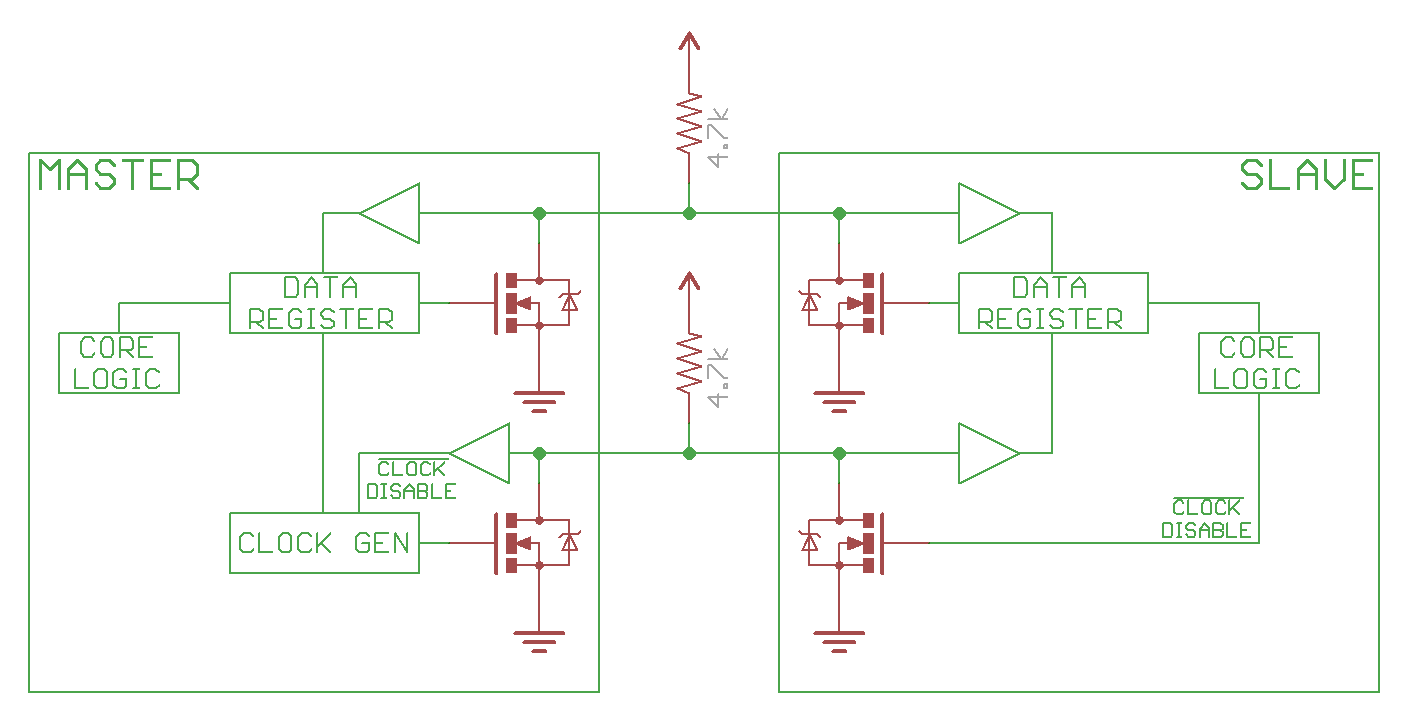
1.2 controller (master), peripheral(slave) use open drain drivers, to pull the line low, turn on the FET, to have the line high, just disconnect the FET (open drain), and the pull up resistor will pull line to high.
below image is from Sparkfun tutorials (sparkfun i2c tutorial)

1.3 speed 
100kHz (Standard Mode)
400kHz (Fast Mode, Fm)
1MHz(Fast Mode Plus, Fm+)
3.4MHz(High-Speed Mode, Hs)
5MHz(Ultra Fast Mode, Ufm) - completely different bus, no pullup resistor, not common at all yet.

1.4 Start/Stop conditions
The only time the data line can change when the clock line is high is during the Start and Stop conditions.
Start marks the beginning of I2C transaction, bus must be idle, both SDA and SCL must be high. SDA goes low first, followed shortly by SCL.
Stop marks the end of I2C transaction. bus must be active, both SDA and SCL must be low. SCL goes high first, followed by SDA.

1.5 Sending Address and Data
Controller must send an address for every transaction. the address is to identify the peripheral that the controller is trying to talk to.
The address is 7bits, with one extra bit for Read(1)/Write(0).
Data is sampled at rising clock edge.
During regular transmissions, the the Controllers/Peripherals must wait until the clock line is low before changing the data line to set for the next bit to transmit.
data is always sent in unit of 8bits (1 Byte), transmitted most significant bit (MSB) first.

1.6. ACK/NACK
Each 8bits data/address must be followed by a ACK/NACK bit.
The side receiving the data needs to drive the ACK/NACK bit.
ACK bit is 0, NACK is 1.
when the controller is sending address, the NACK is set if no peripherals match that address.
when controller is writing, the peripheral send ACK if 
when controller is reading, the controller send ACK if it wants to continue read data, and NACK to notify the peripheral to end the transaction.

1.7 Arbitration
arbitraion is automatic. Each controller is monitoring the line state, and the losing side will know it lost the arbitration once it trying to send a 1 but the line state is 1. It's non destructive, in that the winning side does not even know that there is a arbitration happened! that's the beauty of 

1.8 Repeated Start Condition
sometimes controller end a transaction by sending another Start condition instead of a Stop condition. this is called Repeated Start Condition. this happens when controller wants to start a new transaction without letting go of the bus. Common example is when controller wants to switch from writing data to a peripheral to reading data from a peripheral.

1.9 10-bit Addressing
a specific 7-bit address value (7'b11110xx) denotes that the I2C is using 10-bit extended addressing scheme. the first two bits of the 10-bit address is in the last 2 bits of the 7-bit address value, and the remaining 8bits is sent as the following data byte. the read immediately after write is bit different, refer to Fig. 15 in the I2C spec.

1.10 Clock Streching

2. Arduino Software Application

Sunday, August 2, 2020

PRBS using linear feedback shift register implemented in Python

#! /usr/bin/env python3

def prbs_gen(msg, bitwidth, poly, seed, pam_mode):
    print(msg, 'poly=', poly, 'seed=', seed, ':')
    mask = ~((~0)<<bitwidth);
    lfsr = seed
    period = 0
    bit = 0

    while period < 32:
        for x in range(pam_mode+1):
            bit <<= 1
            bit |= cal_parity(mask&(poly&lfsr))
            lfsr = mask & ( (lfsr <<1) | (bit&1) )

        if pam_mode == 1 :
            bit &= 0x3
            gray_code_dict = {0:0, 1:1, 2:3, 3:2}
            bit = gray_code_dict[bit];
        else:
            bit &=0x1

        if period%4 == 0:
            print(' ', end='')

        print(bit, end='')
        period += 1
    print('\n')
    return period


def cal_parity(value):
    value ^= (value>>16)
    value ^= (value>>8)
    value ^= (value>>4)
    value &= 0xf
    return (0x6996>>value)&0x1

#below are example unction calls for some prbs types:
prbs_gen('LT136/LT162 prbs13Q 0', 13, 0x1803, 0x1aa0, 1);
prbs_gen('LT136/LT162 prbs13Q 1', 13, 0x1046, 0x105c, 1);
prbs_gen('LT136/LT162 prbs13Q 2', 13, 0x108a, 0x0689, 1);
prbs_gen('LT136/LT162 prbs13Q 3', 13, 0x1112, 0x0822, 1);
prbs_gen('LT93 prbs11 0', 11, 0x630, 0x3f5, 0);
prbs_gen('LT93 prbs11 1', 11, 0x530, 0x513, 0);
prbs_gen('LT93 prbs11 2', 11, 0x4a8, 0x5a7, 0);
prbs_gen('LT93 prbs11 3', 11, 0x468, 0x36f, 0);
prbs_gen('LT72 prbs11 0', 11, 0x503, 0x36f, 0);

raspberry pi gpio controls

#gpiozero library https://gpiozero.readthedocs.io/en/stable/#