- make bus randomized during invalid cycle, to catch dut bugs that did not check valid signals. However, the constraint should still give 0 bus value a weight, so that 0 bus value can happen in invalid cycle, just in case that in real chip, the bus value is gated to 0 by upper layer module.
- bugs of features that cross two subsystems are difficult to catch. if a value generated in one module, and will be used in next module, it has a higher chance to have bug uncatched, as it needs correct model behavior as real hardware. solution: a) it's better to try to implement this in the same module, instead of split it into different modules, if possible. an example is the idle insertion/deletion to accommodate the AM (alignment marker) insertion/deletion in PCS. in this case, it's better to implement it in PCS instead of in MAC.
- bugs of features that related to performance AND cross two subsystems are extremely difficult to catch. possible solutions: a) in subsystem level, force to speed up counter value count, and increase pkt counts and so on, so that the possibility is increased. however, this needs very specific test scenarios; b) use hardware acceleration or e, e.g. Palladium or Synopsys ZeBu; c) chip top test to simulate the cross subsystem behaviors
- simplify architecture based on real application. sometimes, smart design means simple brutal force. this one needs the architects sensitivity to the industry use scenarios. I have two examples: a) initially we design our switch to have all kinds of protocols and features to both be legacy device compatible and also includes new features. this leads to overdesign and many bugs (insufficient man power and verification time). however, data center ethernet switch are more focused on feed and speed, it needs high throughput, less focused on protocols. end results, a lot of features are not used, a lot of hot new architectures (like SDN) are not used. this is big waste of resources. b) ...?
- Review every registers with DE in review meetings. Need to decide for every register: a) what is its meaning and actual use case (e.g. how does software guy config it, how does SA test it in real chip); b) can it be randomized in base test or should be tested in specific test; c) does it have some values that are often used by SA and Customer in real chip? weighted distribution?
- Review base config randomization constraints for base test. this is also related to 5) as some of the configs are registers. it needs designer and SA's input to confirm.
- simulation time vs packets number: Do Not trade packets number for simulation time. Meaning that do not try to save hardware resources. For verification, the first priority is function correctness, and the more packet number, the more possible that a bug will be hit. CPU resources are cheap, real chip bugs are expensive!
- random noise register/memory access during every test. But make sure that the noise and actually traffic can actually hit the same register/memory to trigger corner bugs.
- there should be 2 types of checker for a features if it cannot be accurately checked in every scenarios: a) a specific test that accurately check it's function; b) a general checker which is enabled in every testcase, and act as a sanity checker, in case there is some fundamental bugs in certain corner cases, which was not found in the a).
- choose the constraint range carefully, and choose the random value carefully. speed mode, pkt number, and the event happen time are all related, need to consider them when setting constraint or randomization range.
- have status and counters for monitors and controlling tb in cfg or virtual interface. for example, have counter count received pkt count, or have status variable to monitor dut is in transmiting or idle state, and so on.
Tuesday, August 27, 2019
Digital Design Verification Subsystem Lessons Learned

Tuesday, August 20, 2019
Protocols
1. IIC or I²C (Inter-Integrated Circuit)
3. UART(Universal Asynchronous Receiver/Transmitter)
freebsd Serial and UART Tutorial
The Start bit always has a value of 0 (a Space). The Stop Bit always has a value of 1 (a Mark). This means that there will always be a Mark (1) to Space (0) transition on the line at the start of every word, even when multiple word are transmitted back to back. This guarantees that sender and receiver can resynchronize their clocks regardless of the content of the data bits that are being transmitted. refer to stm32f103 reference manual S.27.3.3: 16X oversampling was used to detect noise errors.
4. ARM AMBA

From here, the rest of the transaction occurs on the read data channel. When the master is ready for data it asserts its RREADY signal. The slave then places data on the RDATA line and asserts that there is valid data (RVALID). In this case, the slave is the source and the master is the receiver. Recall that VALID and READY can be asserted in any order so long as VALID does not depend on READY. This read represents a single burst transaction made up of 4 beats or data transfers. Notice the slave asserts RLAST when the final beat is transferred.

AXI Interconnect:
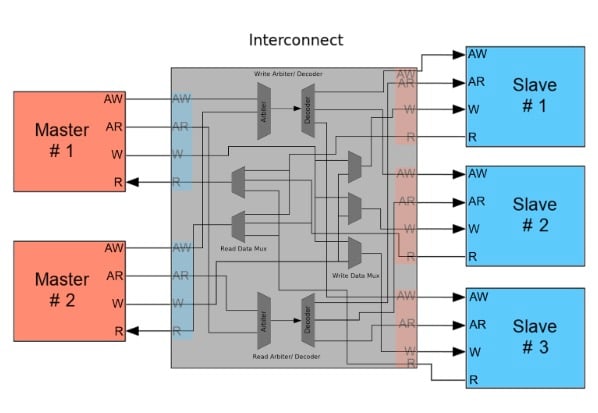
– Bus topology / routing / resources:
From this point of view, I²C is a clear winner over SPI in sparing pins, board routing and how easy it is to build an I²C network.
– Throughput / Speed:
If data must be transferred at ‘high speed’, SPI is clearly the protocol of choice, over I²C. SPI is full-duplex; I²C is not. SPI does not define any speed limit; implementations often go over 10 Mbps. I²C is limited to 1Mbps in Fast Mode+ and to 3.4 Mbps in High Speed Mode – this last one requiring specific I/O buffers, not always easily available.
– Elegance:
Both SPI and I2C offer good support for communication with low-speed devices, but SPI is better suited to applications in which devices transfer data streams, while I²C is better at multi master ‘register access’ application.
Conclusions.
In the world of communication protocols, I²C and SPI are often considered as ‘little’ communication protocols compared to Ethernet, USB, SATA, PCI-Express and others, that present throughput in the x100 megabit per second range if not gigabit per second. Though, one must not forget what each protocol is meant for. Ethernet, USB, SATA are meant for ‘outside the box communications’ and data exchanges between whole systems. When there is a need to implement a communication between integrated circuit such as a microcontroller and a set of relatively slow peripheral, there is no point at using any excessively complex protocols. There, I²C and SPI perfectly fit the bill and have become so popular that it is very likely that any embedded system engineer will use them during his/her career.
2. RTC (Real-Time Clock)3. UART(Universal Asynchronous Receiver/Transmitter)
freebsd Serial and UART Tutorial
The Start bit always has a value of 0 (a Space). The Stop Bit always has a value of 1 (a Mark). This means that there will always be a Mark (1) to Space (0) transition on the line at the start of every word, even when multiple word are transmitted back to back. This guarantees that sender and receiver can resynchronize their clocks regardless of the content of the data bits that are being transmitted. refer to stm32f103 reference manual S.27.3.3: 16X oversampling was used to detect noise errors.
4. ARM AMBA
Read Transaction:
To start the transaction off, the master places the slave's address on the ARADDR line and asserts that there is a valid address (ARVALID). Following time T1, the slave asserts the ready signal (ARREADY). Remember the source of data asserts the valid signal when information is available, while the receiver asserts the ready signal when it is able to consume that information. For a transfer to occur both READY and VALID must be asserted. All of this happens on the read address channel, with the address transfer completing on the rising edge of time T2.
Write Transaction:
What about writes? Figure 3 shows a timing diagram of an AXI write transaction. The addressing phase is similar to a read. A master places an address on the AWADDR line and asserts a valid signal. The slave asserts that it's ready to receive the address and the address is transferred.
Next, on the Write Data Channel, the master places data on the bus and asserts the valid signal (WVALID). When the slave is ready, it asserts WREADY and data transfer begins. This transfer is again 4 beats for a single burst. The master asserts the WLAST when the last beat of data has been transferred.
In contrast to reads, writes include a Write Response Channel where the slave can assert that the write transaction has completed successfully.
This is where AXI provides the most flexibility. Instead of prescribing how multi-master and multi-slave systems work, the AXI standard only defines the interfaces and leaves the rest up to the designer. If the system has multiple masters attempting to communicate with a single slave, then the AXI Interconnect may contain an arbiter that routes data between the master and slave interfaces. This arbiter could be implemented using simple priorities, a round-robin architecture, or whatever suits the designer's needs.
Systems that use multiple masters and multiple slaves could have interconnects containing arbiters, decoders, multiplexers, and whatever else is needed to successfully process transactions. This might include logic to translate between AXI3, AXI4, and AXI4-Lite protocols.
Additionally, interconnects can perform bus-width conversion, use data FIFOs, contain register slices to break timing paths, and even convert between two different clock domains.
Burst len, size, type:
The burst length for AXI3 is 1~16, for AXI4 is 1~256(INCR) and 1~16(other burst type)
Burstsize: the maximum number of bytes to transfer in each data transfer, or beat, in a burst.
If the AXI bus is wider than the burst size, the AXI interface must determine from the transfer address which byte of lanes of the data bus to use for each transfer. See Data read and write structure on axi spec.
The size of any transfer must not exceed the data bus width of either agent in the transaction.
Interesting history: Why a burst cannot cross a 4KB address boundary
Out of order:
Data from read transaction ARID values can arrive in any order
Interleave:
Read data of transaction with different ARID values can be interleaved
Write Interleaved: AXI3 support, but the first item of write data must be issued in the same order as the write address. AXI4 does not support interleave.
MIB RFC:
RFC2819 : Remote Network Monitoring Management Information Base
RFC2863: The Interfaces Group MIB
RFC3273: Remote Network Monitoring Management Information Base for High
RFC4836: Definitions of Managed Objects for IEEE 802.3 Medium Attachment Units (MAUs)
RFC3635: Definitions of Managed Objects for the Ethernet-like Interface Types
PFC MIB counter
Networking Protocols:
1. What is the exact difference between SGMII and 1000Base-X?
Unaligned Address:
TODO
AXI response
5. USB2.0
USB2 made simple(better and low level)
USB in a nutshell(introductory)
6. SPI
MIB RFC:
RFC2819 : Remote Network Monitoring Management Information Base
RFC2863: The Interfaces Group MIB
RFC3273: Remote Network Monitoring Management Information Base for High
RFC4836: Definitions of Managed Objects for IEEE 802.3 Medium Attachment Units (MAUs)
RFC3635: Definitions of Managed Objects for the Ethernet-like Interface Types
PFC MIB counter
Networking Protocols:
1. What is the exact difference between SGMII and 1000Base-X?
Tuesday, July 23, 2019
Perl Notes
system()
Using the Perl system() functionThe system() function returns two numeric values folded into one. The first is the Unix signal (e.g INT=2, QUIT=3, KILL=9), if any, that terminated the command. This is stored in the lower eight bits returned. The next higher eight bits contain the exit code for the command you executed.
The result is a compound numeric value, not a logical value. This also reads inverted and is confusing. If you need more information on error, then you can break up the return code:
my $status = system("rotate_quickly.pl");
my $signal = $status & 0xff;
my $exit_code = ($status >> 8) & 0xff;
String
how to keep all special characters in a string?
the use of q() and quotemeta: stackoverflow post on excaping in perl
Monday, July 15, 2019
UVM Notes
This article is to list down the most used constructions of UVM to my personal understanding.
2) a specialized cfg task is set_config_* for uvm_component class, where * can be int, string or object, depending on type of config property:
1) `uvm_field_int (<field_name>, <flags>)
2) `uvm_field_object (<field_name>, <flags>)
3) `uvm_field_string (<field_name>, <flags>)
4) `uvm_field_event (<field_name>, <flags>)
#static Array:
1) `uvm_field_sarray_enum (<enum_type>, <field_name>, <flags>)
2) `uvm_field_sarray_int (<field_name>, <flags>)
3) `uvm_field_sarray_object (<field_name>, <flags>)
4) `uvm_field_sarray_string (<field_name>, <flags>)
#dynamic Array:
1) `uvm_field_array_enum (<enum_type>, <field_name>, <flags>)
2) `uvm_field_array_int (<field_name>, <flags>)
3) `uvm_field_array_object (<field_name>, <flags>)
4) `uvm_field_array_string (<field_name>, <flags>)
#dynamic Array:
1) `uvm_field_queue_enum (<enum_type>, <field_name>, <flags>)
2) `uvm_field_queue_int (<field_name>, <flags>)
3) `uvm_field_queue_object (<field_name>, <flags>)
4) `uvm_field_queue_string (<field_name>, <flags>)
#associative Array:
1) `uvm_field_aa_<d_type>_<ix_type>
UVM simulator steps
- VCS(Synopsys)
- IUS(Cadence)
- Questa(Mentor)
1. set $UVMHOME to instal dir of required UVM library
2. Use irun option -uvmhome to reference $UVMHOME
3. Use incdir to reference any included file directories
%irun -f run.f
run.f:
-uvmhome $UVMHOME
-incdir .../sv
.../sv/tb_pkg.sv
top.sv
top.sv:
module top();
import uvm_pkg::*;
import tb_pkg::*;
initial begin
//run test
...
end
endmodule: top
Debugging case:
when using 3 step compile on vcs, vlogan and elab must both add uvm_dpi.cc to actually compile the c. add the file in file list does not work.
if using 1 step compile, then just need to include the file in filelist.
UVM Directory Structure
contains two kinds of code:
UVM_ROOT UVM_TOP
Tips: (1) debug features
uvm_top.print_topology(); //advised to be called from end_of_elaboration_phase
=======================================
If you look into the uvm source code, run_test() task is actually a task defined in the class uvm_root. it's the implicit top-level and phase controller for all UVM components. the UVM automatically creates a single instance of <uvm_root> that users can access via the global (uvm_pkg-scope) variable uvm_top.
- long time confusion solved: the run_test() called in top tb module is defined in uvm_globals.svh which actually calls the run_test() in uvm_root.
- uvm_test_top is not a variable in uvm_root, how can you access that with uvm_root?
- class uvm_root extends uvm_component
- const uvm_root uvm_top = uvm_root::get();
- uvm_top is the top-level component, and any component whose parent is specified as NULL becomes a child of uvm_top.
- uvm top manages the phasing for all components.
- set globally the report verbosity, log files, and actions(?).
- Because uvm_top is globally accessible (in uvm_pkg scope(?)), UVM's reporting mechanism is accessible from anywhere outside uvm_component, such as in modules and sequences.
UVM Configuration
1) uvm_config_db- uvm_config_db#(int)::set(this, "env.agent", "is_active", UVM_PASSIVE);
- uvm_config_db#(int)::set(null, "uvm_test_top.env.agent", "is_active", UVM_PASSIVE);
- uvm_config_db#(int)::set(uvm_root::get(), "uvm_test_top.env.agent", "is_active", UVM_PASSIVE);//equivalent to using null
- uvm_config_db#(int)::set(null, "*.env.agent", "is_active", UVM_PASSIVE);
- uvm_config_db#(int)::set(null, "uvm_test_top.env*", "is_active", UVM_PASSIVE);
- Database must be type parameterized. this allows config db to be created for any standard or user-defined type; and allows better compile time checking.
- Methods are static
- Methods use a specific contxt argument, whi is usually this; unless the set is called from the top module, in which case it must be assigned to null
- syntax: static function void set(uvm_component cntxt, string inst_name, string field_name, ref T value)
- syntax: static function void get(uvm_component cntxt, string inst_name, string field_name, ref T value)
- get is only required when set is called from the top level module or outside the build phase
- syntax: static function bit exists(uvm_component cntxt, string inst_name, string field_name, bit spell_chk = 0)
- syntax: static task wait_modified(uvm_component cntxt, string inst_name, string field_name)
- inst_name may contain wildcards or regular expression syntax
- for object, interfaces or user-defined types, use uvc_config_db
- for run-time configuration, use uvc_config_db
2) a specialized cfg task is set_config_* for uvm_component class, where * can be int, string or object, depending on type of config property:
- config settings are automatically resolved in UVM build phase; that is because apply_config_settings() is executed in the build phase (when super.build_phase() is called in any uvm_component class). settings are applied only when match is found, if not found, field names will be unset, and mismatched configuration set's should be listed at end of simulation.
- syntax: virtual function void set_config_in (string inst_name, string field, bitstream_t value)
- inst_name is relative pathname to a specific component instance from the component where the method is called
- field is a string containing a config property name of the instance class
- set build options before calling super.build_phase; this is also why the parameters are strings, because the components and fields does not exist yet.
- set_config_int("env.agent", "is_active", UVM_PASSIVE);
- set_config_int("*", "recording_detail", 1);//default is 0, by enabling the recording details for every component, transactions can be viewed in the waveform window(?)
- the creation of the agent instance in the parent build_phase() triggers the execution of the build_phase() of the agent instance.
- config property must be automated in the component where declared (field registered)
- Config settings in higher scope take precedence over lower scopes.
- Config settings in the same scope conform to "last one in wins"
UVM Field Automation
#Non-array1) `uvm_field_int (<field_name>, <flags>)
2) `uvm_field_object (<field_name>, <flags>)
3) `uvm_field_string (<field_name>, <flags>)
4) `uvm_field_event (<field_name>, <flags>)
#static Array:
1) `uvm_field_sarray_enum (<enum_type>, <field_name>, <flags>)
2) `uvm_field_sarray_int (<field_name>, <flags>)
3) `uvm_field_sarray_object (<field_name>, <flags>)
4) `uvm_field_sarray_string (<field_name>, <flags>)
#dynamic Array:
1) `uvm_field_array_enum (<enum_type>, <field_name>, <flags>)
2) `uvm_field_array_int (<field_name>, <flags>)
3) `uvm_field_array_object (<field_name>, <flags>)
4) `uvm_field_array_string (<field_name>, <flags>)
#dynamic Array:
1) `uvm_field_queue_enum (<enum_type>, <field_name>, <flags>)
2) `uvm_field_queue_int (<field_name>, <flags>)
3) `uvm_field_queue_object (<field_name>, <flags>)
4) `uvm_field_queue_string (<field_name>, <flags>)
#associative Array:
1) `uvm_field_aa_<d_type>_<ix_type>
#flags
UVM_NOVOMPARE
#the do_* functions are worth more discussion later.
uvm_factory
b extends a, c extends a, override(a,c)
will b be affected?
Tips: (1) how to use factory debug features.
uvm_factory::get().print(); //prints the uvm_factory details like registration and override. can be called from build phase, connect phase or mostly likely end_of_elaboration_phase.
UVM Phasing
Tips:(1) phasing debug features (not very useful)
sim option +UVM_PHASE_TRACE
(2) objection debugging
sim option +UVM_OBJECTION_TRACE
UVM_sequence
start_item()
finish_item()
get_response()
driver:
seq_item_port.get_next_item(),
seq_item_port.item_done(),
seq_item_port. put(resp)
UVM_POOL
uvm_object_string_pool #(T)
pool.get(string) #get object by a name
Scoreboard
A scoreboard normally consists of 3 components of functions:
1) reference model/transfer function
c++, systemC or systemverilog: a) existing C model; b) create model, not in collaboration with design team( duplication of errors)
2) Data Storage
model output instant, DUT takes time to output. Need to store data (and synchronization)
Queue: output data in same order as input order
Associative Array: out of order output. Key unique and knonw for input and output. herefore, key is either: a) untransformed port of data, or b) can be generated from data
3) comparison/check logic
Scoreboard internals:
update counter, tracking received, dropped, matched, and mismatched
report_phase, print summary of statistics
end of simulation: check scoreboard queues are empty
Scoreboard must create a new copy of received data item by cloning, before writing the cloned packet to the queue.
Scoreboard internals:
update counter, tracking received, dropped, matched, and mismatched
report_phase, print summary of statistics
end of simulation: check scoreboard queues are empty
Scoreboard must create a new copy of received data item by cloning, before writing the cloned packet to the queue.
UVM TLM Communication bwtween Components
TLM concepts: Port and Imp
Data Flow: producer create data, consumer consume data
Producer ---data---> Cosumer
Control Flow: Initiator sends request to Target
Initiator ---request---> Target
producer is initiator: write operation, also called push/put: e.g. analysis connections
producer is target: read operation, also called pull/get
Port: TLM connection object for Initiator
Imp (implementation): TLM connection object for target.
Export:
symbols: square(port), circle(imp), triangle(export)
port.connect(Imp)
port.connect(Export)
TLM Analysis Interface
uvm_analysis_port #(data type) ap_out
ap_out = new("ap_out", this);
`uvm_analysis_imp_decl(_foo)
uvm_analysis_imp_foo #(data type) foo_in
`uvm_analysis_imp_decl(_bar)
uvm_analysis_imp_foo #(data type) bar_in
function void write_foo(input ---);
endfunction
function void write_bar(input---);
endfunction
...ap_out.connect(...ap_in)
Complex Module UVC connection(external to intermal)
two ways:
1. Module monitor: all external connections are made to this monitor and monitor is responsible for routing connections to other component in the UVC.
the good: Single, central location for connecting external TLM interfaces.
the bad: at the expense of additional internal interface connections to other components.
2. Module connections: external TLM interfaces are placed on UVC itself, then routed using hierarchical connections and not separate TLM interface. use of TLM export object
the good: fewer TLM connections
the bad: losing some readability
Port initiators can be connected to port, export, or imp targets.
Export initiators can be connected to export or imp targets.
Imp cannot be a connection initiator. Imp is a target only, and is always the last connections object on a route.
TLM FIFO
Analysis FIFO
uvm_tlm_analysis_fifo is a specialization of uvm_tlm_fifo:
unbounded (size=0)
analysis_export replaces put export, support analysis write method.
uvm_analysis_port ---> analysis_export---analysis_fifo---get_peek_export <---scoreboard_get_port
uvm_tlm_analysis_fifo #(data type) tb_fifo = new("...", this);
uvm_get_port $(data type) sb_in = new("...", this);
function void connect_phase();
sb_in.connect(tb_fifo.get_peek_export)
endfunction
by the way, analysis fifo's blocking_get_export is just an alias to get_peek_export
Data Flow: producer create data, consumer consume data
Producer ---data---> Cosumer
Control Flow: Initiator sends request to Target
Initiator ---request---> Target
producer is initiator: write operation, also called push/put: e.g. analysis connections
producer is target: read operation, also called pull/get
Port: TLM connection object for Initiator
Imp (implementation): TLM connection object for target.
Export:
symbols: square(port), circle(imp), triangle(export)
port.connect(Imp)
port.connect(Export)
TLM Analysis Interface
uvm_analysis_port #(data type) ap_out
ap_out = new("ap_out", this);
`uvm_analysis_imp_decl(_foo)
uvm_analysis_imp_foo #(data type) foo_in
`uvm_analysis_imp_decl(_bar)
uvm_analysis_imp_foo #(data type) bar_in
function void write_foo(input ---);
endfunction
function void write_bar(input---);
endfunction
...ap_out.connect(...ap_in)
Complex Module UVC connection(external to intermal)
two ways:
1. Module monitor: all external connections are made to this monitor and monitor is responsible for routing connections to other component in the UVC.
the good: Single, central location for connecting external TLM interfaces.
the bad: at the expense of additional internal interface connections to other components.
2. Module connections: external TLM interfaces are placed on UVC itself, then routed using hierarchical connections and not separate TLM interface. use of TLM export object
the good: fewer TLM connections
the bad: losing some readability
Port initiators can be connected to port, export, or imp targets.
Export initiators can be connected to export or imp targets.
Imp cannot be a connection initiator. Imp is a target only, and is always the last connections object on a route.
TLM FIFO
Analysis FIFO
uvm_tlm_analysis_fifo is a specialization of uvm_tlm_fifo:
unbounded (size=0)
analysis_export replaces put export, support analysis write method.
uvm_analysis_port ---> analysis_export---analysis_fifo---get_peek_export <---scoreboard_get_port
uvm_tlm_analysis_fifo #(data type) tb_fifo = new("...", this);
uvm_get_port $(data type) sb_in = new("...", this);
function void connect_phase();
sb_in.connect(tb_fifo.get_peek_export)
endfunction
by the way, analysis fifo's blocking_get_export is just an alias to get_peek_export
Wednesday, July 10, 2019
Ethernet Protocol Notes
Gigabit Ethernet:
this post is about 1G Physical Coding Sublayer (PCS), and explains scrambler/descrambler. Note the way it explains Bit Error Rate (BER).
Gigabit Ethernet 1000BASE-T
scrambling -> Spread Spectrum
this post is about 1G Physical Coding Sublayer (PCS), and explains scrambler/descrambler. Note the way it explains Bit Error Rate (BER).
Gigabit Ethernet 1000BASE-T
scrambling -> Spread Spectrum
Thursday, May 30, 2019
Digital Design and Computer Architecuture Study Notes
Bottome-up progression:
Number system -> Boolean algebra -> Boolean algebra using electrical switches -> Logic Gates -> addition (base of all calculation) -> subtraction -> combinational(NO FEEDBACK) without feedback, value change immediately (unstable) & sequential(FEEDBACK) feedback can make state(stable) -> memory, calculation without memory is not very useful -> Conditional Jump (Controlled repetition or looping is what separates computers from calculators.)
Power Consumption:
-Pdynamic = 1/2*CVDD**2f; Voltage on the capacitor switches at frequency f, it charges the capacitor f/2 times and discharges it f/2 times per second. Discharging does not draw energy from the power supply.
-Pstatic = IDD*VDD
Logic Gates:
-NOT Gate, Buffer, AND Gate, OR Gate, XOR, NAND, NOR, Transmission Gate
Combinational Logic:
characterized by its propagation delay and contamination delay. The propagation delay, tpd, is the maximum time from when an input changes until the output or outputs reach their final value. The contamination delay, tcd, is the minimum time from when an input changes until any output starts to changes its value.Combinational logic has no cyclic paths and no races. If inputs are applied to combinational logic, the outputs will always settle to the correct value within a propagation delay.
-Building blocks: full adders, seven-segment display decoders, multiplexer, decoder, priority circuits, arithmetic circuits
-Boolean algebra
-Karnaugh maps: works well for problems with up to four variables. More importantly they give insight into manipulating Boolean equations. Gray code. Dont care for output can be treateed as either 0's or 1's at the designer's discretion.
-Glitches: insight from Karnaugh maps
Sequential Logic:
SR Latch:D Latch: copies D to Q when clk is 1
D flip-flop: copies D to Q on the rising edge of the clock, and remembers it's state at all other times
synchronous sequential circuit composition teaches us that a circuit is a synchronous sequential circuit if it consists of interconnected circuit elements such that:
-Every circuit element is either a register or a combinational circuit
-At least one circuit element is a register
-All registers receive the same clock signal
-Every cyclic path contains at least one register
-Building blocks: arithmetic circuits, counters, shift registers, memory arrays, and logic arrays.
Finite state machine:
-An FSM consists of two blocks of combinational logic, next state logic and output logic, and a register that stores the state.-There are two general classes of finite state machines: Moore machines (the outputs depend only on the current state of the machine), and Mealy machines (the outputs depend only on both the current state and the current inputs).
-HDL descriptions of state machines are correspondingly divided into three parts to model the state register, the next state logic, and the output logic.
Verilog Blocking and Nonblocking Assignement:
-Use always @ (posedge clk) and nonblocking assignments to model synchronous sequential logic.always @ (posedge clk)
begin
n1 <= d; //nonblocking
q <= n1; //nonblocking
end
-Use continous assignments to model simple combinational logic.
assign y = s ? d1 : d0;
-Use always @ (*) and blocking assignments to model more complicated combinational logic where the always statement is helpful
(A case statement implies combinational logic if all possible input combinations are defined; otherwise it implies sequential logic, because the output will keep its old value in the undefined cases.)
(If statement implies combinational logic, if all possible inputs combinations are handled; otherwise it produces sequential logic.)
(It is good practice to use blocking assignments for combinational logic and nonblocking assignments for sequential logic.)
(Signals in always statement and initial statement must be declared as reg type)
(Not that signal must be declared as reg because it appears on the left hand side of a <= or = sign in an always statement. Nevertheless, it does not mean it's the output of a register, and it can be the output of a combinational logic.)
always @ (*)
begin
p = a^ b; //blocking
g = a & b;//blocking
s = p ^ cin;
cout = g | (p & cin);
end
-Do not make assignments to the same signal in more than one always statement or continuous assignment
-assign statemns must be used outside always statements and are also evaluated concurrently. a type of continuous assignment.
-case statement and if statements must appear inside always statements.
Verilog
-verilog provide generate statements to produce a variable amount of hardware depending on the value of a parameter. generate supports for loops and if statements to determine how many of what types of hardware to produce.
-Testbenches use the === and !=== operators for comparisons of equality and inequality respectively, because these operators work correctly with operands that could be x or z.
-the For loop, can be either synthesizable, where it is used to simply expand replicated logic, and they do not loop like in a c program; it can also be non synthesizable, behave like a c program, can have delay in side, not in always statement?.
-Understand the following:
1) reg and wire (Berkeley CS150)
reg is a confusing term, it is used for anything that holds data. wire cannot retain any data, henceforth it must be driven by continuous assignments.
read 2) to understand what is state.
wire: continuous assignment only, can resolve multiple driver.
reg: a language failure, it's just a varialbe, nothing to do with register. can hold varaible, therefore procedural assignment. cannot be multiple driver. can model both combinational and sequential logic.
2) Inferred Latch (stackoverflow)3) blocking and non-blocking
4) a neat blinky
5) port connection data types wire or reg: (refer to Verilog HDL by Samire Palnitkar)
port as internal unit and external input.
any side that is the data source, it can be either types. (external inputs, or internal outputs)
any side that is the data monitor, it must be net type so can be continuously assigned. (internal inputs, inout, or external outputs). a module instantiation is to connect the input/output signals continuously. so the internal input must be net, and the external output must be net, as it is implicitly driven continuously.
Friday, April 19, 2019
Linux command line notes
Questions:
1. i'm the owner of a file, but i cannot delete the file, why? (a tricky problem i encountered before, it is because you must have write permission to the parent directory before you can delete the file)
readlink:
readlink -f file_relative_path #prints the absolute path of a file or symbolic link
#-f the last component of the path must exist
diff:
1. recursively diff files in two direcotries:
diff -r dir0 dir1
2. -q consice output showing only the differences
3. tkdiff is a guide version, not very useful, but still works in some case. (gvim -d is much better in accuracy)
4. diff --suppress-common-lines -y file1 file2 | wc -l (count number of differences)
uniq:
#to reorge and remove duplicate lines for input
%uniq
#to only show the duplicated entries of original input, very useful
%uniq -d
#to only show the uniq lines of the original input
%uniq -u
#easy one to find the duplicated files (same filenames)
%find . -type f -execdir echo {} ';'|sort|uniq -d
cp:
cp --parents sourc destdir #keep full source directory path, warning: the destdir must be an existing directory name
awk:
%awk -F":" -v OFS=',' '{print $1, $2, 9}' fname
#substitue, eg. removing white space
%awk '{gsub(/ /, ""); print $2}'
sed 's/word1/word2/g' input.file > output.file
sed (Stream EDitor):
sed 's/word1/word2/g' input.filesed 's/word1/word2/g' input.file > output.file
#in-place change file
sed -i 's/word1/word2/g' input.file
sed -i -e 's/word1/word2/g' -e 's/xx/yy/g' input.file
## use + separator instead of /
sed -i 's+regex+new-text+g' file.txt
## you can add I option to case insensitive search, only works with GNU sed.sed -i 's/word1/word2/g' input.file
sed -i -e 's/word1/word2/g' -e 's/xx/yy/g' input.file
## use + separator instead of /
sed -i 's+regex+new-text+g' file.txt
sed -i 's/word1/word2/gI' input
# use ; to concatenate multiple expressions
sed -e 's/word1/word2/g;s/word3/word4/g' #equivalent to below
sed -e 's/word1/word2/g' -e 's/word3/word4/g'
#cool trick in MAC to do equivalent to tree
%alias tree="find . -print | sed -e 's;[^/]*/;|____;g;s;____|; |;g'"
#bulk replacement of string for whole folder
find . -type f| xargs see -i ‘s/pattern_org/pattern_new/g’
Clearly using xargs is far more efficient. In fact several benchmarks suggest using xargs over exec {} is six times more efficient.
#-t will print each command, then immediately execute it:
find . -name "filename" | xargs -t tail
%sleep 5s #delay 5 seconds, m: minute, h: hour, d: day.
xargs:
Linux and Unix xargs command tutorial with examplesClearly using xargs is far more efficient. In fact several benchmarks suggest using xargs over exec {} is six times more efficient.
#-t will print each command, then immediately execute it:
find . -name "filename" | xargs -t tail
#you can use -I to define a place-holder which will be replaced with each value of the arguments fed to xargs. For example ({} can be changed to any replace_string),
ls -1 | xargs -I '{}' echo '{}'
xargs -I '{}' tail '{}'/'{}'.run.log
#-i behaves like -I , except that the placeholder is
optional. If you omit the placeholder string, it defaults to the string {
}.
ls -1 | xargs -i echo '{}'
ls -1 | xargs -i echo '{}'
find and grep:
FIND -EXEC VS. FIND | XARGS#!!!find by default wont follow symbolic link, to enable it use "-L", man for help
find xxx -L
#find files but not directory names
find . -type f
#find files but not directory names
find . -type f
#find directories
find . type d
#find files specify depth
find . -maxdepth 2
#TODO: -print option?
#find with inode number
find . -inum <234567>
#find files specify depth
find . -maxdepth 2
#TODO: -print option?
#find with inode number
find . -inum <234567>
#follow symbolic link, except when broken
find . -name xxx -L
#find symbolic links
find . -type l
#find but do not print the directory hierarchy
find . [other options] -execdir echo {} ';'
map Caps Lock to Ctrl key in Gnome
curl -o [shortname] [url] #save file as another name
curl -o ~/Desktop/localexample.dmg http://url-to-file/example.dmg #save to another directory
curl -o /dev/null http://speedtest.wdc01.softlayer.com/downloads/test10.zip #test download speed with curl
curl -O [URL 1] [URL 2] [URL 3] #download multiple files concurrently
curl -L -O -C - url #Use "-C -" to tell curl to automatically find out where/how to resume the transfer. It then uses the given output/input files to figure that out.
-L #Follow location if HTTP 3xx status code found. For example, redirect url. in this case, if -L is ommitted, the actual file will not be downloaded
curl Command Resume Broken DownloadHow to Run Speed Test from the Command Line to Check Internet Connection Speed
# download all jpg files named cat01.jpg to cat20.jpg
curl -O http://example.org/xyz/cat[01-20].jpg
Other useful options are:
--referer http://example.org/ → set a referer (that is, a link you came from)
--user-agent "Mozilla/4.0 (compatible; MSIE 7.0; Windows NT 5.1; .NET CLR 1.1.4322)" → set user agent, in case the site needs that.
xterm:
#send a terminal to another host
xterm -display <IP>:0
xterm -display <hostname>:0
# download a file
wget http://example.org/somedir/largeMovie.mov
# download website, 2 levels deep, wait 9 sec per page
wget --wait=9 --recursive --level=2 http://example.org/
Some sites check on user agent. (user agent basically means browser). so you might add this option “--user-agent=”.
wget http://example.org/ --user-agent='Mozilla/5.0 (Macintosh; Intel Mac OS X 10_13_6) AppleWebKit/537.36 (KHTML, like Gecko) Chrome/72.0.3626.96 Safari/537.36'
wget -r -np -k http://www.ime.usp.br/~coelho/mac0122-2013/ep2/esqueleto/
use -r (recursive), -np (don't follow links to parent directories), and -k to make links in downloaded HTML or CSS point to local files
Other useful options:
-nd (no directories): download all files to the current directory
-e robots.off: ignore robots.txt files, don't download robots.txt files
-A png,jpg: accept only files with the extensions png or jpg
-m (mirror): -r --timestamping --level inf --no-remove-listing
-nc, --no-clobber: Skip download if files exist
tar -cvf fileName.tar file1 file2 file3
tar -cvf fileName.tar dir1 dir2 dir3
tar -cvf fileName.tar file1 dir1
#to compress
$ tar -cvzf docs.tar.gz /home/vivek/Documents/
$ tar -cvjf docs.tar.bz2 /home/vivek/Documents/
#to list contents of tar
$ tar -tvf docs.tar
$ tar -tvzf docs.tar.gz
$ tar -tvjf docs.tar.bz2
#to extract
$ tar -xvf docs.tar
$ tar -xvzf docs.tar.gz
$ tar -xvjf docs.tar.bz2
For example, here's what i use to sync/upload my website on my local machine to my server.
rsync -z -a -v -t --exclude="*~" --exclude=".DS_Store" --exclude=".bash_history" --exclude="*/_curves_robert_yates/*.png" --exclude="logs/*" --exclude="xlogs/*" --delete --rsh="ssh -l joe" ~/web/ joe@example.com:~/
-a → archived mode, basically making the file's meta data (owner/perm/timestamp) same as the local file (when possible) and do recursive (i.e. Upload the whole dir).
cURL:
curl -O [url] #save to local with the save file namecurl -o [shortname] [url] #save file as another name
curl -o ~/Desktop/localexample.dmg http://url-to-file/example.dmg #save to another directory
curl -o /dev/null http://speedtest.wdc01.softlayer.com/downloads/test10.zip #test download speed with curl
curl -O [URL 1] [URL 2] [URL 3] #download multiple files concurrently
curl -L -O -C - url #Use "-C -" to tell curl to automatically find out where/how to resume the transfer. It then uses the given output/input files to figure that out.
-L #Follow location if HTTP 3xx status code found. For example, redirect url. in this case, if -L is ommitted, the actual file will not be downloaded
curl Command Resume Broken DownloadHow to Run Speed Test from the Command Line to Check Internet Connection Speed
# download all jpg files named cat01.jpg to cat20.jpg
curl -O http://example.org/xyz/cat[01-20].jpg
Other useful options are:
--referer http://example.org/ → set a referer (that is, a link you came from)
--user-agent "Mozilla/4.0 (compatible; MSIE 7.0; Windows NT 5.1; .NET CLR 1.1.4322)" → set user agent, in case the site needs that.
xterm:
#send a terminal to another host
xterm -display <IP>:0
xterm -display <hostname>:0
wget:
# download a filewget http://example.org/somedir/largeMovie.mov
# download website, 2 levels deep, wait 9 sec per page
wget --wait=9 --recursive --level=2 http://example.org/
Some sites check on user agent. (user agent basically means browser). so you might add this option “--user-agent=”.
wget http://example.org/ --user-agent='Mozilla/5.0 (Macintosh; Intel Mac OS X 10_13_6) AppleWebKit/537.36 (KHTML, like Gecko) Chrome/72.0.3626.96 Safari/537.36'
wget -r -np -k http://www.ime.usp.br/~coelho/mac0122-2013/ep2/esqueleto/
use -r (recursive), -np (don't follow links to parent directories), and -k to make links in downloaded HTML or CSS point to local files
Other useful options:
-nd (no directories): download all files to the current directory
-e robots.off: ignore robots.txt files, don't download robots.txt files
-A png,jpg: accept only files with the extensions png or jpg
-m (mirror): -r --timestamping --level inf --no-remove-listing
-nc, --no-clobber: Skip download if files exist
tcsh:
Learn X in Y minutes where X=tcshtar:
#to tartar -cvf fileName.tar file1 file2 file3
tar -cvf fileName.tar dir1 dir2 dir3
tar -cvf fileName.tar file1 dir1
#to compress
$ tar -cvzf docs.tar.gz /home/vivek/Documents/
$ tar -cvjf docs.tar.bz2 /home/vivek/Documents/
#to list contents of tar
$ tar -tvf docs.tar
$ tar -tvzf docs.tar.gz
$ tar -tvjf docs.tar.bz2
#to extract
$ tar -xvf docs.tar
$ tar -xvzf docs.tar.gz
$ tar -xvjf docs.tar.bz2
rsync:
Linux: Sync Across Machines, rsyncFor example, here's what i use to sync/upload my website on my local machine to my server.
rsync -z -a -v -t --exclude="*~" --exclude=".DS_Store" --exclude=".bash_history" --exclude="*/_curves_robert_yates/*.png" --exclude="logs/*" --exclude="xlogs/*" --delete --rsh="ssh -l joe" ~/web/ joe@example.com:~/
-a → archived mode, basically making the file's meta data (owner/perm/timestamp) same as the local file (when possible) and do recursive (i.e. Upload the whole dir).
-P or --progress: this will nicely show the progress of copying
-z → use compression for transmission. (compress files first, transmit, uncompress. This saves bandwidth.)
-v → verbose mode. Print out which files is being updated.
-t → copy timestamp from source to destination. If you don't, rsync will basically update every file. Timestamp is used by rsync to check if file's been updated. -a implies -t.
--exclude=glob_pattern → ignore file names that matches glob_pattern in source directory. (i.e. if it matches, don't upload it, nor delete it on remote server) For example, *.javac means all files ending in .javac
--delete → if a file/dir in destination is not in source directory, delete it.
-z → use compression for transmission. (compress files first, transmit, uncompress. This saves bandwidth.)
-v → verbose mode. Print out which files is being updated.
-t → copy timestamp from source to destination. If you don't, rsync will basically update every file. Timestamp is used by rsync to check if file's been updated. -a implies -t.
--exclude=glob_pattern → ignore file names that matches glob_pattern in source directory. (i.e. if it matches, don't upload it, nor delete it on remote server) For example, *.javac means all files ending in .javac
--delete → if a file/dir in destination is not in source directory, delete it.
-n this is cool dry run option, see what will be copied before performing real operation, and if everything is ok, remove -n from command line.
Here's a example of syncing Windows and Mac.
rsync -z -r -v --delete --rsh="ssh -l xah" ~/web/ xah@169.254.125.147:~/web/
Note that -r is used instead of -a. The -r means recursive, all sub directories and files. Don't use -a because that will sync file owner, group, permissions, and others, but because Windows and unix have different permission systems and file systems, so -a is usually not what you want.
Here's a example of reverse direction.
rsync -z -a -v -t --rsh="ssh -l joe" joe@example.org:~/web/ ~/
Here's a example of syncing Windows and Mac.
rsync -z -r -v --delete --rsh="ssh -l xah" ~/web/ xah@169.254.125.147:~/web/
Note that -r is used instead of -a. The -r means recursive, all sub directories and files. Don't use -a because that will sync file owner, group, permissions, and others, but because Windows and unix have different permission systems and file systems, so -a is usually not what you want.
Here's a example of reverse direction.
rsync -z -a -v -t --rsh="ssh -l joe" joe@example.org:~/web/ ~/
copy files from one location to another, excluding certain files/folders:
rsync -av --progress sourcefolder /destinationfolder --exclude thefoldertoexclude --exclude anotherfoldertoexclude
rsync -av --progress sourcefolder /destinationfolder --exclude thefoldertoexclude --exclude anotherfoldertoexclude
Debian/Ubuntu:
#update system packages:sudo apt-get update
sudo apt-get upgrade
#alternative
sudo apt-get update && sudo apt-get upgrade -y #-y will provide the confirmation automatically
#search package name:
apt-cache search keyword
apt-get update
apt-get install
#uninstall packages
%sudo apt purge --auto-remove package0 package1 package2...
sleep:
delay in shell script%sleep 5s #delay 5 seconds, m: minute, h: hour, d: day.
ps:
%ps auxww #display in bsd formatThe aux options are as follows:
a = show processes for all users
u = display the process’s user/owner
x = also show processes not attached to a terminal
%ps -x #process owned by you
%timeout -s SIGKILL 10s command #force kill (SIGKILL) in 10 seconds, cannot be ignored by command
%timeout -k 10 5 command #send soft kill in 5s, if command not terminated, then force kill it 5s after that(10s=5+5).
%p4 diff2 -q //...@label_name_0 //...@label_name_1
ls -i
timeout:
%timeout 10s command #send soft kill (SIGTERM) in 10 seconds, this may be ignored by the command%timeout -s SIGKILL 10s command #force kill (SIGKILL) in 10 seconds, cannot be ignored by command
%timeout -k 10 5 command #send soft kill in 5s, if command not terminated, then force kill it 5s after that(10s=5+5).
Perforce:
#compare differences between two labels:%p4 diff2 -q //...@label_name_0 //...@label_name_1
ls:
#list inode of filels -i
git:
git clone https://github.com/github.com/libopencm3/libopencm3.git
git clone xxx new_dir_name
system task:
#show system info in ASCII format
screenfetch
#change password
sudo passwd root
sudo passwd account_name
#add a new user
sudo adduser user_name #ubuntu/debian
sudo useradd -m newuser #arch/manjaro
#add user to sudo group
sudo usermod -aG sudo username #debian/ubuntu
sudo usermod -aG wheel <username> #arch/manjaro
#test
su - username
#delete user
sudo deluser --remove-home newuser #debian/ubuntu
sudo userdel -r newuser #arch/manjaro
#shutdown system
%shutdown
#restart linux
%shutdown -r
#shutdown or restart immediately
%shutdown now
%shudown -r now
#scheduled shutdown
%shutdown 20 #shutdown in 20 mins
%shutdown -h 17:30 #shutdown at 17:30
%shutdown -r 17:30 #restart at 17:30
#cancel scheduled shutdown
%shutdown -c
#add shutdown wall message
%shutdown 'YOUR WALL MESSAGE'
Mount disk:
%lsblk #show the partition tables of all disks, note if there is partion on your disk, you need to mount the partition name instead of the disk name
%dmesg | tail #after connect the usb disk, run this command to find the name of the disk. normalled in /dev/sd*
%sudo mount /dev/sdb1 /mnt/pico
%umount device|directory. #safely unjoint device before you unplug it
List Devices:
%lspci #list pcie devices
#example to list macbook pcie devices
%lspci | grep -E 'Atheros|Broadcom'
%lsusb
Enable SSH remote connection:
%sudo apt install openssh-server
%sudo systemctl start ssh
%sudo systemctl enable ssh
%sudo systemctl status ssh #check current ssh status
Change default boot into Command line or GUI:
%systemctl get-default
%sudo systemctl set-default multi-user.target
%sudo systemctl reboot
#to switch back to gui, replace above command correspondingly
%sudo systemctl set-default graphical.target
Command history:
%cmd<Ctrl-r> #search revsersely through command history and auto complete
%<Esc> #put command on screen(<Enter> will execute that command
%<Ctrl-E> #similar to <Esc>
Command line settings:
#configure the looks of non gui mode command line:
sudo dpkg-reconfigure console-setup
#set time zone
timedatectl list-timezones
sudo timedatectl set-timezone "America/Los_Angeles"
prefix key Ctrl-b
#=========================================
#=============in terminal
#==========================================
%tmux ls # list all open tmux sessions
%tmux attach -t session-name #attach to a existing session
%tmux new-s session-name #create new session
%tmux rename-session -t session-old-name session-new-name
%tmux kill-session -t session-name
#==========================================
#=============inside tmux
#==========================================
#copy mode
%prefix [ #enter copy mode, where you can select and copy text in a pane
%prefix ] #paste the copied text to current pane
#sessions
prerfix s #list all session
prefix :kill-session #kill current session
prefix d #detach session
#windows
prefix w # list all windows
prefix window-number #switch to a selected window
prefix c #create a new window
prefix , #rename current window
prefix & #close current window
#panes
prefix z #toggle zoom the current pane to full screen
prefix Arrow-key #switch to pane
prefix x #close current pane
prefix % #create new vertical pane
prefix " #create new horizontal pane
Battery Status
%upower -e #same as —enumerate, enumerates object paths for devices
%upower -i device path #display information about the laptop battery (replace the path below with your battery's path
Subscribe to:
Posts (Atom)