Wednesday, November 4, 2020

I2C IIC Tutorial

 1. The Protocol

I2C Specification from NXP

Resolving address conflicts: https://embeddedartistry.com/blog/2021/08/02/resolving-i2c-address-conflicts/

1.1 Controller control the bus, in particular controls the SCL clock line to control the speed of transmissions
Peripherals cannot control the bus directly.
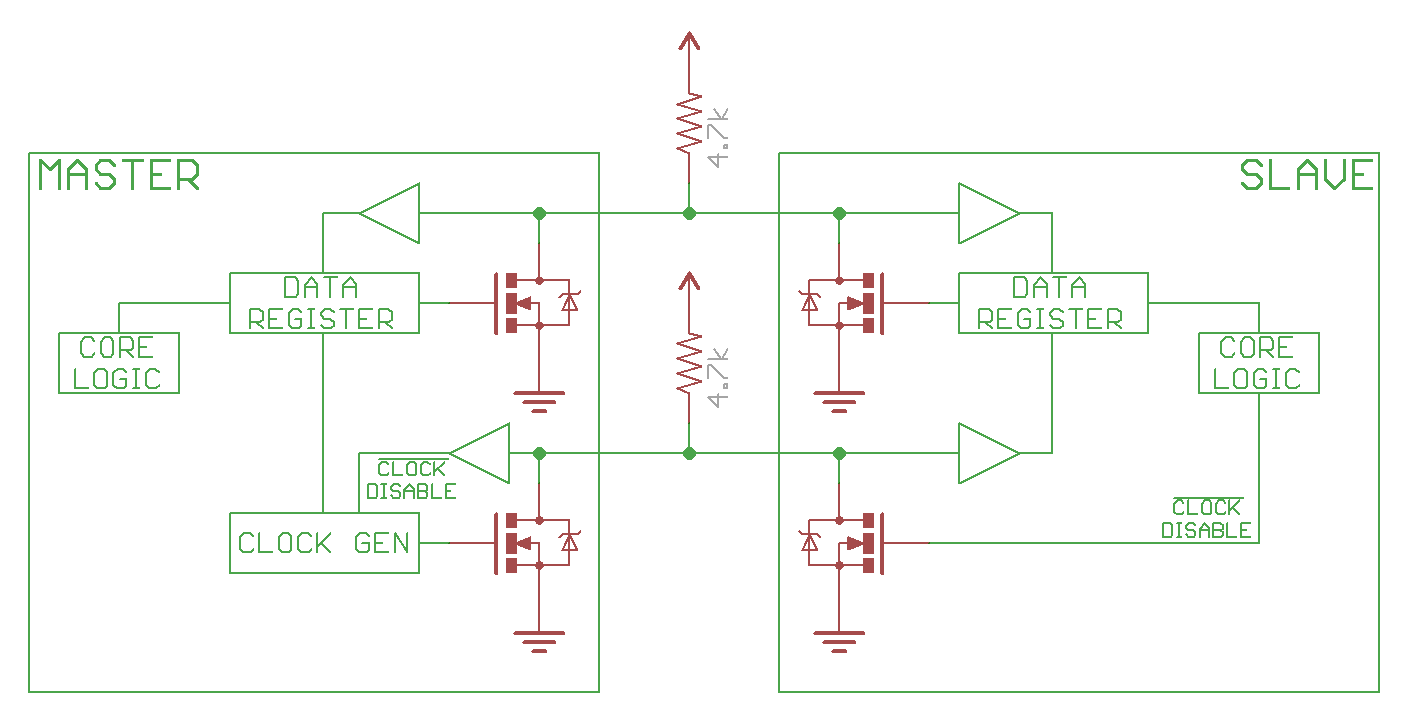
Pull-up resistors for pull up line to high. Resistor selection varies with devices on the bus, but a good rule of thumb is to start with 4.7kΩ resistor and adjust down if necessary. I2C is a fairly robust protocol, and can be used with short runs of wire (2-3m). For long runs, or systems with lots of devices, smaller resistors are better.

1.2 controller (master), peripheral(slave) use open drain drivers, to pull the line low, turn on the FET, to have the line high, just disconnect the FET (open drain), and the pull up resistor will pull line to high.
below image is from Sparkfun tutorials (sparkfun i2c tutorial)
1.3 speed 
100kHz (Standard Mode)
400kHz (Fast Mode, Fm)
1MHz(Fast Mode Plus, Fm+)
3.4MHz(High-Speed Mode, Hs)
5MHz(Ultra Fast Mode, Ufm) - completely different bus, no pullup resistor, not common at all yet.

1.4 Start/Stop conditions
The only time the data line can change when the clock line is high is during the Start and Stop conditions.
Start marks the beginning of I2C transaction, bus must be idle, both SDA and SCL must be high. SDA goes low first, followed shortly by SCL.
Stop marks the end of I2C transaction. bus must be active, both SDA and SCL must be low. SCL goes high first, followed by SDA.

1.5 Sending Address and Data
Controller must send an address for every transaction. the address is to identify the peripheral that the controller is trying to talk to.
The address is 7bits, with one extra bit for Read(1)/Write(0).
Data is sampled at rising clock edge.
During regular transmissions, the the Controllers/Peripherals must wait until the clock line is low before changing the data line to set for the next bit to transmit.
data is always sent in unit of 8bits (1 Byte), transmitted most significant bit (MSB) first.

1.6. ACK/NACK
Each 8bits data/address must be followed by a ACK/NACK bit.
The side receiving the data needs to drive the ACK/NACK bit.
ACK bit is 0, NACK is 1.
when the controller is sending address, the NACK is set if no peripherals match that address.
when controller is writing, the peripheral send ACK if 
when controller is reading, the controller send ACK if it wants to continue read data, and NACK to notify the peripheral to end the transaction.

1.7 Arbitration
arbitraion is automatic. Each controller is monitoring the line state, and the losing side will know it lost the arbitration once it trying to send a 1 but the line state is 1. It's non destructive, in that the winning side does not even know that there is a arbitration happened! that's the beauty of 

1.8 Repeated Start Condition
sometimes controller end a transaction by sending another Start condition instead of a Stop condition. this is called Repeated Start Condition. this happens when controller wants to start a new transaction without letting go of the bus. Common example is when controller wants to switch from writing data to a peripheral to reading data from a peripheral.

1.9 10-bit Addressing
a specific 7-bit address value (7'b11110xx) denotes that the I2C is using 10-bit extended addressing scheme. the first two bits of the 10-bit address is in the last 2 bits of the 7-bit address value, and the remaining 8bits is sent as the following data byte. the read immediately after write is bit different, refer to Fig. 15 in the I2C spec.

1.10 Clock Streching

2. Arduino Software Application

Sunday, August 2, 2020

PRBS using linear feedback shift register implemented in Python

#! /usr/bin/env python3

def prbs_gen(msg, bitwidth, poly, seed, pam_mode):
    print(msg, 'poly=', poly, 'seed=', seed, ':')
    mask = ~((~0)<<bitwidth);
    lfsr = seed
    period = 0
    bit = 0

    while period < 32:
        for x in range(pam_mode+1):
            bit <<= 1
            bit |= cal_parity(mask&(poly&lfsr))
            lfsr = mask & ( (lfsr <<1) | (bit&1) )

        if pam_mode == 1 :
            bit &= 0x3
            gray_code_dict = {0:0, 1:1, 2:3, 3:2}
            bit = gray_code_dict[bit];
        else:
            bit &=0x1

        if period%4 == 0:
            print(' ', end='')

        print(bit, end='')
        period += 1
    print('\n')
    return period


def cal_parity(value):
    value ^= (value>>16)
    value ^= (value>>8)
    value ^= (value>>4)
    value &= 0xf
    return (0x6996>>value)&0x1

#below are example unction calls for some prbs types:
prbs_gen('LT136/LT162 prbs13Q 0', 13, 0x1803, 0x1aa0, 1);
prbs_gen('LT136/LT162 prbs13Q 1', 13, 0x1046, 0x105c, 1);
prbs_gen('LT136/LT162 prbs13Q 2', 13, 0x108a, 0x0689, 1);
prbs_gen('LT136/LT162 prbs13Q 3', 13, 0x1112, 0x0822, 1);
prbs_gen('LT93 prbs11 0', 11, 0x630, 0x3f5, 0);
prbs_gen('LT93 prbs11 1', 11, 0x530, 0x513, 0);
prbs_gen('LT93 prbs11 2', 11, 0x4a8, 0x5a7, 0);
prbs_gen('LT93 prbs11 3', 11, 0x468, 0x36f, 0);
prbs_gen('LT72 prbs11 0', 11, 0x503, 0x36f, 0);

Friday, May 8, 2020

Photoshop

photoshop

Affinity Photo with pen tablet:
Ctrl+Alt(option)+drag: left/right for brush size, up/down for hardness
Spacebar+Cmd+drap: left/right zoom out/in
Cmd+0: zoom to fit window
B: brush tool
J: healing brush
J: spot healing brush
S: clone stamp
H: hand tool(view)
New Layer: Shift+Cmd+N

Tuesday, December 10, 2019

questions

Regex:
how to match non empty strings between two elements?
[Python] what is difference between re.search(), re.match() and re.findall(), when to use each of them?

[Python] how to execute multiline code in the python interpreter? use backslashes to continue on the next line

[Python] how to test if a variable is empty string or contains only space or is none? if a or a.strip(), this will first test if it's None, then test if it only contains spaces, tabs, newlines and so on.

[Python] how to test if a variable is True, False, or None?
test True: if a is True
#if a is a non-zero number, a will evaluate to true, but a number is not the same as boolean True! keep in mind of this.
test None: if a is None
#None is a special singleton object, there can only be one. Just check to see if you have that object.
test False: a not True and not None, then it's

[Python] how to check if a variable is a string?
method a: isinstance(a, str)
The isinstance function takes two arguments. The first is your variable. The second is the type you want to check for. in Python 3.x, all types are classes.

method b: if type(a) == str:
use the type built-in function to see the type of variables. None:'NoneType', booleans:'bool', strings:'str', numbers:'int','float', lists:'list', tuples:'tuple', dictionaries:'dict', ...

Thursday, October 10, 2019

Systemverilog simulators related

performance profile

VCS:
    profile in VCS by time or memory.
    #for memory profiling
        -simproile    //compile option
        -simprofile mem    //simulation option
    #for time profiling
        -simprofile    //compile options
        -simprofile time    //sim options
    the profile report will be store at compile directory named "profilereport"

IUS:
    debug sim hang by using cpu usage report
    compile option: -linedebug
    simulation option: -profile
    at sim hang point, stop test by: Ctrl+c (1 time), then ncsim>exit
    check the ncprof.out file (cpu usage summary and source code location)

Coverage

code coverage fefinition:
line/statement: will not cover module/end module/comments/time scale
block: begin...end, if...else, always
expression:
branch: case
conditional: if...else,  ternary operator (?:)
toggle:
FSM:

VCS:
%vcs -cm line+tgl+branch source.v
%simv -cm branch

vcs urg (Unified Report Generator):
%urg -dir simv1.vdb [simv2.dir simv3.vdb ...] -metric line+cond+branch -report specified_ouput_dir    //general options
%urg ... -parallel -sub bsub -lsf ""    //run urg in parallel to speed up
%urg -elfile <filename>    //for exclusion files
%dve -covdir simv.vdb//view coverage db directly in DVE

Dump Waveform

1. Options
setenv FSDB_FORCE    //to display forced signals in highlight in waveform viewer
2. sdf
3. use do file to control fsdb dump.
%vcs -ucli -do PATH_OF_DO_FILE    //simulation options
below is a sample tcl do file:
####start of file###############
#control fsdb dump
set run_time_before_dump 0us
set dump_all 1
set run_time 400us
run $run_time_before_dump
set TOP eth_top_tb
fsdbDumpfile $TOP.fsdb
if (dump_all == 1) {
    fsdbDumpvars 3 $TOP
    fsdbDumpvars 0 $TOP.xxx...
    fsdbDumpMDA 1 $TOP...
} esel {
    ...
}
run $run_time
exit
####end of file################
4.dump force information
simv +fsdb+force
5.dump glitch info
Before VCSMX/1509, 
simv +fsdb+sequential +fsdb+glitch=0 +fsdb+region
+fsdb+glitch=num,0表示所有的glitch都保存,1表示最近的glitch保存,2表示最近两个glitch被保存 
After VCSMX/1509, 
simv +fsdb+delta

Race Condition

VCS:
+evalorder    //vcs sim option
                     //eval combinational group then behavioral group.
                     //reduce race, refer to vcs userguide

Monday, September 30, 2019

Physical layer of Networking Hardware

prbs generator:

Random bit sequence using Verilog
prbs polynomials used in networking
Fibonacci form and Galois form

Fibonacci form: Another unique feature to this form is that the values in the shift register aren’t modified between when they are originally calculated and the output–making it possible to see then next LN output bits by just examining the shift register state. 

I have seen it used for prbs(peudo random binary sequence in ethernet transmission protocols for scrambler/descrambler, encoding pad, random pattern generation for loopback testing, Cyclic redundancy check(CRC) and so on), timer( non linear incremental timer, as lfsr normally has a fixed perioed)

References:
wiki
Generating Pseudo-Random Numbers on an FPGA
An example LFSR


ADC OSC(oversampling ratio):

The basics of sigma delta analog-to-digital converters
Delta-sigma modulation

Explaining SerDes:
(Chinese) SerDes Knowlege: notice the limitations of parallel transmission.

circuit noises:

simultaneously switching noise an overview/

raspberry pi gpio controls

#gpiozero library https://gpiozero.readthedocs.io/en/stable/#